

Using Python Scripts to Dynamically Update dbt Projects via the Manifest
When working on a dbt project, you’ll often find yourself managing dozens or even hundreds of models, their associated YAML (.yml) files, and other related files. This can quickly become repetitive and error-prone, especially when multiple developers are contributing to the same project. Even with best practices and pull request (PR) checks in place, human errors still happen. A common issue is when someone adds a new dbt model but forgets to include the corresponding YAML file. While tools like dbt-checkpoint (which validates YAML presence) and dbt-codegen (which generates YAML files) exist, these still involve manual steps that include running tests, identifying missing files, generating them, and moving them to the right location. By automating this process with Python, you can eliminate most of the manual work and make YAML management both faster and more reliable.
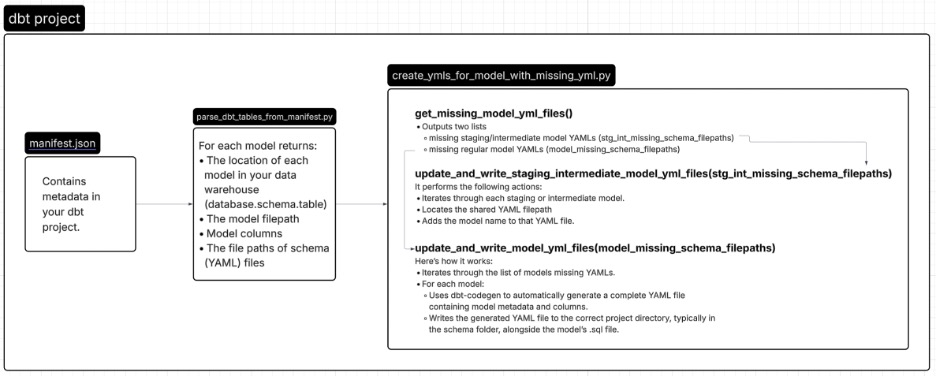
Before writing the Python logic, it helps to understand what information you’ll need. The key to this automation lies in dbt’s manifest.json file. The manifest.json file stores metadata about your dbt project such as:
- The location of each model in your data warehouse (database.schema.table)
- The model filepath
- Model columns and dependencies
- The file paths of schema (YAML) files
- Materializations and other metadata
By reading and parsing manifest.json, you can extract all model metadata, detect missing YAML files, and generate or update missing YAML files automatically.
This diagram below visually outlines the process of using the manifest.json file and python scripts to automate YAML files. Then we will talk in detail about what the process looks like.
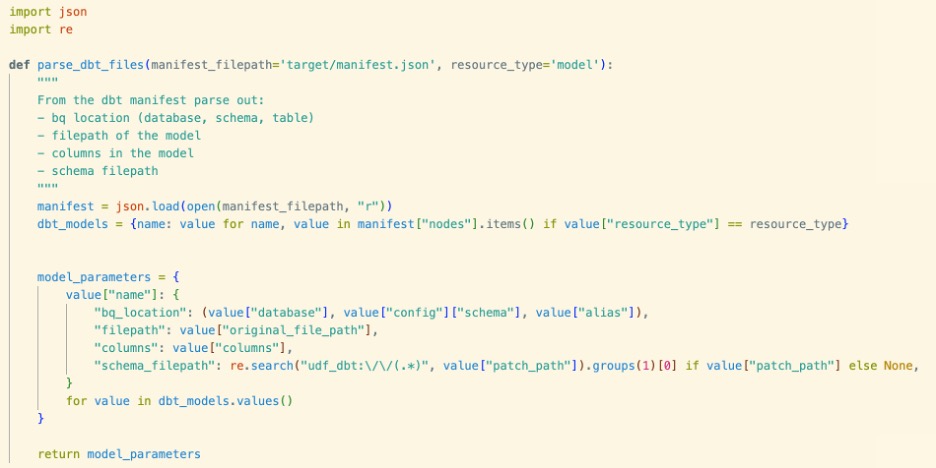
Create a function called parse_dbt_files () that reads the manifest.json file and returns a dictionary where:
- The key is the model name
- The value is its associated parameters (metadata)
This gives you a structured view of all models and associated parameters.
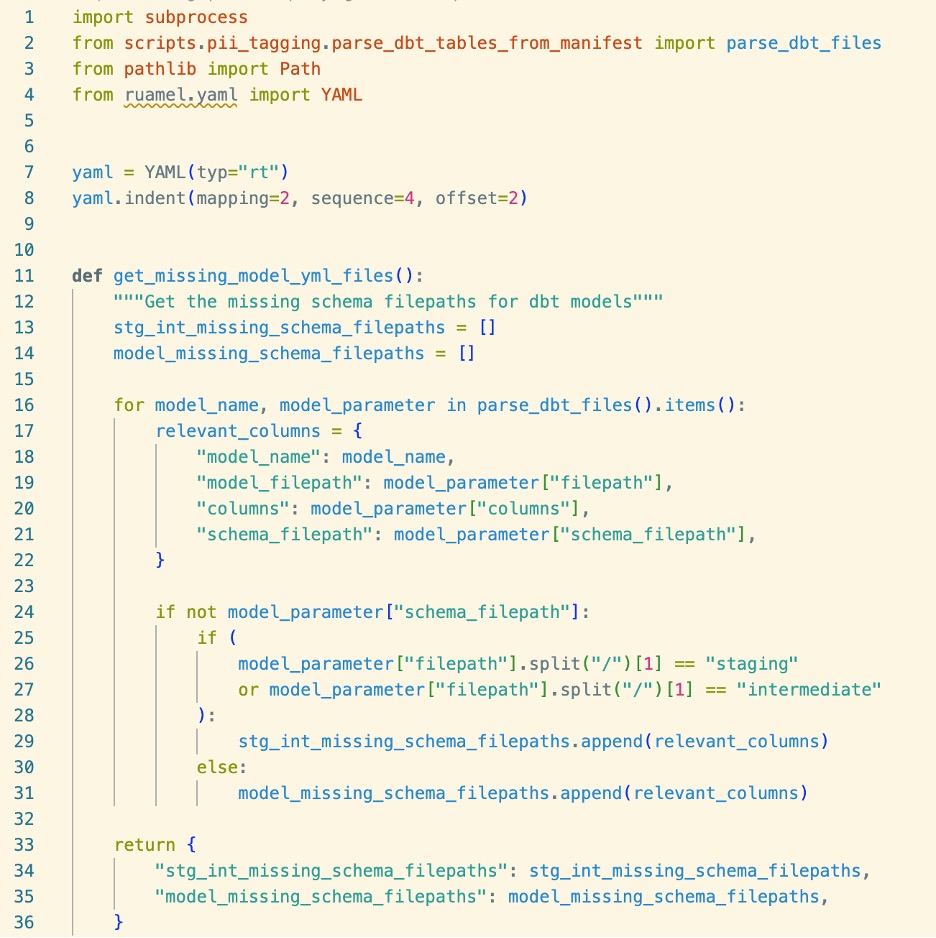
We’ll create a Python script named create_ymls_for_model_with_missing_yml.py that automates the detection and generation of missing YAML files for dbt models. This script will contain three main functions:
- get_missing_model_yml_files ()
- update_and_write_staging_intermediate_model_yml_files (stg_int_missing_schema_filepaths)
- update_and_write_model_yml_files (model_missing_schema_filepaths)
Together, these functions will identify which dbt models are missing YAML files and automatically create or update those files in the correct locations.
get_missing_model_yml_files() function scans through the dbt project using the metadata from manifest.json and determines which models do not have an associated schema (YAML) file.
Here’s what it does:
- Using the manifest.json, check each model to see if the YAML filepath is missing.
- If missing, examines the model’s filepath to determine whether it’s a staging or intermediate model. If the filepath does not indicate it’s a staging or intermediate model, then it will be a regular model.
- Groups models into two categories:
- Staging and intermediate models missing YAML files.
- Regular models missing YAML files.
- Outputs two lists, one for missing staging/intermediate model YAMLs, and another for missing regular model YAMLs.
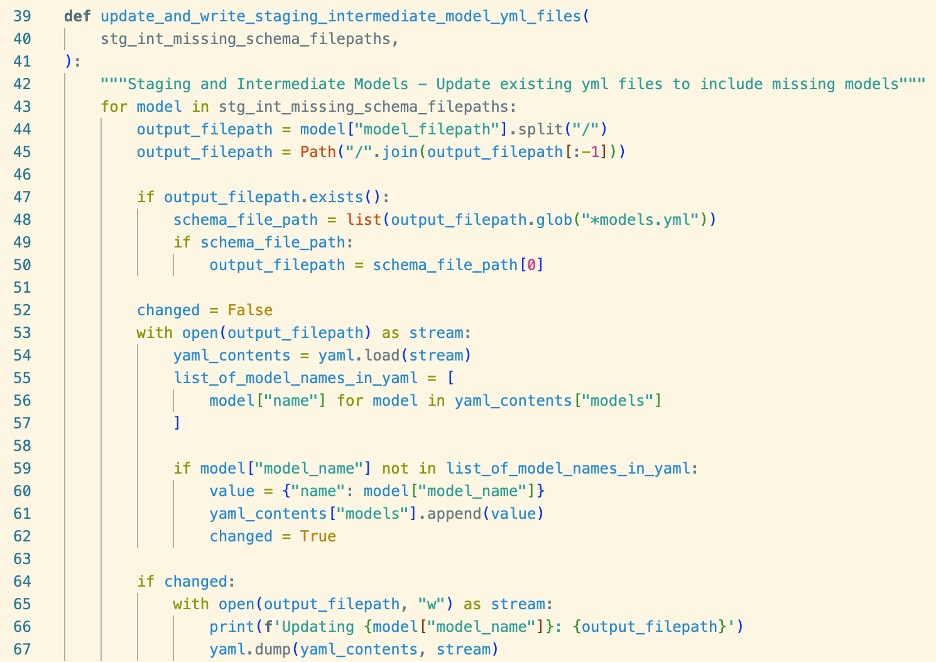
update_and_write_staging_intermediate_model_yml_files (stg_int_missing_schema_filepaths) function takes the list of staging and intermediate models with missing YAML entries (from the previous step) and updates their shared YAML files.
It performs the following actions:
- Iterates through each staging or intermediate model.
- Locates the shared YAML filepath
- Adds the model name to that YAML file.
Note: For this dbt project, the staging and intermediate layers, the convention is to include multiple model definitions in a single YAML file rather than having one YAML file per model. This function ensures that structure is preserved. Only relevant columns that require tests are added to the YAML file.
update_and_write_model_yml_files (model_missing_schema_filepaths) function handles regular dbt models that are missing YAML files.
Here’s how it works:
- Iterates through the list of models missing YAMLs.
- For each model:
- Uses dbt-codegen to automatically generate a complete YAML file containing model metadata and columns.
- Writes the generated YAML file to the correct project directory, typically in the schema folder, alongside the model’s .sql file.
This ensures that all non-staging or non-intermediate models have complete, properly formatted YAML files without requiring manual intervention.

As you can see, automating YAML updates with Python can save you significant time and reduce manual errors. Other cases for utilizing the manifest.json and automating the process includes, in dbt Core v1.10.5 and higher, certain tests require the configs and arguments properties. Missing these can trigger warnings until all cases are fixed or dbt Core v1.8, the tests: syntax was replaced with data_tests: syntax in all YAML files. If your project is small, you might make these changes manually. But in larger projects, this approach is time-consuming and error prone. It’s easy to miss files or introduce inconsistencies. To avoid these issues, you can write a Python script to automate the migration and ensure that every YAML file is updated correctly. Automation not only saves effort now but also makes your project future-proof. Whenever someone adds or modifies YAML files, you can simply rerun your script to keep everything consistent and error‑free.